> For the complete documentation index, see [llms.txt](https://docs.didge.io/home/llms.txt). Markdown versions of documentation pages are available by appending `.md` to page URLs; this page is available as [Markdown](https://docs.didge.io/home/pricing/fsms-starter-packages/4.-thermal-and-probe-set.md).
# 4. Thermal & Probe Set
Advanced Temperature Verification — Redefined
The Thermal & Probe Set is the next step in digital food safety innovation — combining thermal imaging technology with precision temperature probing to deliver an unmatched level of visibility, accuracy, and efficiency in food temperature monitoring.
Powered by the MFC Didge Platform and Ridgy Vision AI, this package provides a robust, data-rich solution for capturing both surface and core temperatures, seamlessly integrated into your food safety records.
***
#### What’s Included
* Access to the Didge Platform with full Ridgy Vision AI integration for thermal and probe data capture
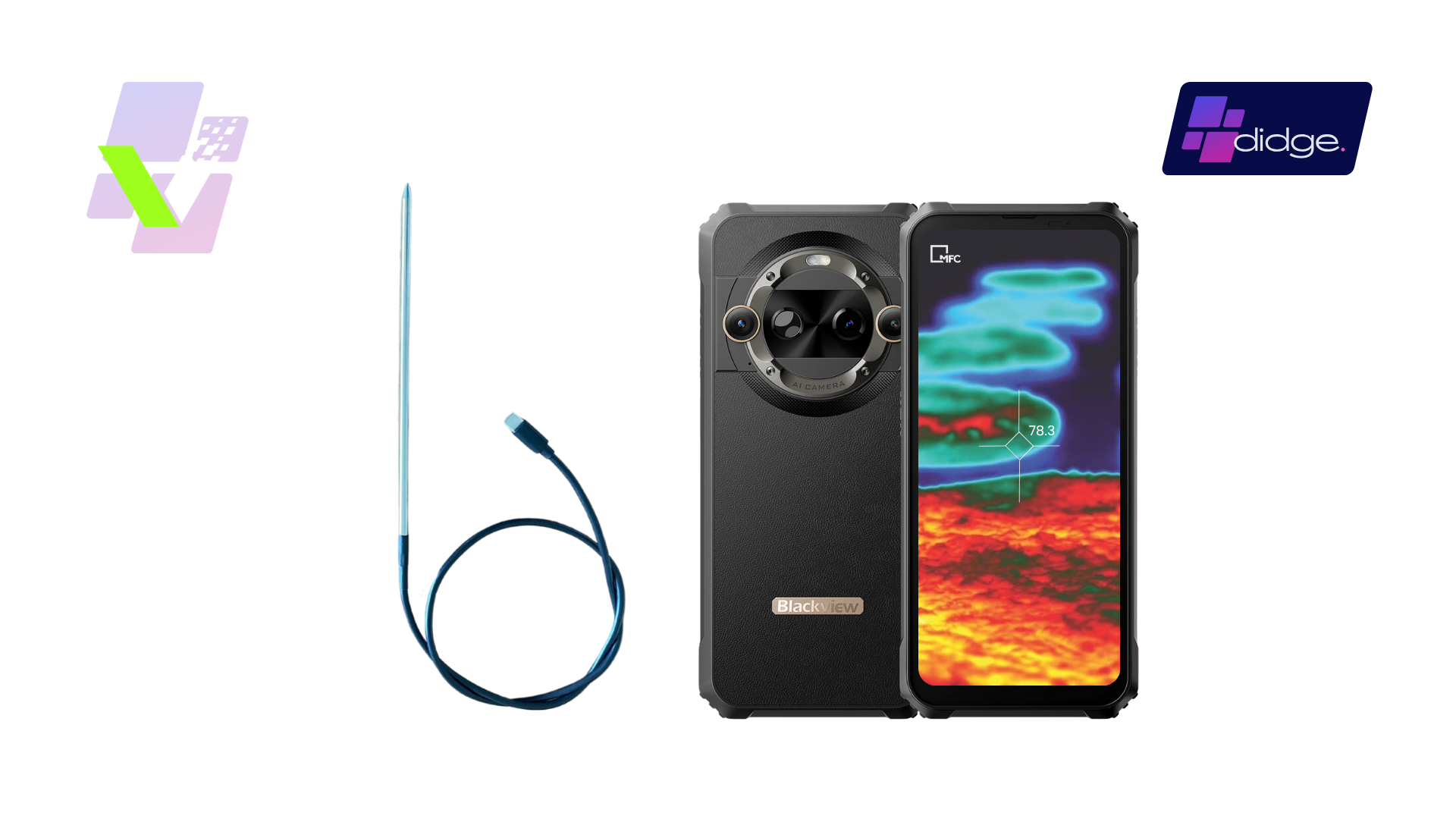
* One BlackView Thermal Imaging Device featuring a built-in FLIR Lepton 3.5 thermal sensor
* One Android C-USB Probe for accurate core temperature readings
* All Ridgy System Modules:
* Incoming Goods
* Stock Controller
* Approved Suppliers
* Cold Story (Cold Storage)
* Cook (Cook Controls)
* Cook Chill (Cook Chilli)
* Best Served Hot (Hot Holding)
* Best Served Cold (Cold Holding)
* Calibration
* Alerts & Notifications
* Corrective Actions
***
#### Hardware Details
The BlackView Thermal Device is a professional-grade Android handset equipped with integrated FLIR Lepton 3.5 thermal imaging hardware — among the most advanced in its class.
Device Highlights:
* Thermal and visible dual camera for both real-world and infrared imaging
* Waterproof (IP68, IP69K, MIL-STD-810H) — submersible for up to 30 minutes
* Long-life battery for extended use in commercial environments
* Preloaded with the Didge and Ridgy apps and fully configured by MFC Safe
Also included is a C-USB food temperature probe, designed for reliable and accurate core temperature readings during service or preparation.
***
#### Surface and Core Temperature — The Perfect Pair
With this set, your team can easily capture both surface and core temperature data for any product or service area:
**Thermal Imagery**
A non-intrusive method ideal for buffets, hot or cold displays, and service lines.
Provides surface temperature readings directly from the thermal image.
Data is automatically tagged, processed by Ridgy Vision AI, and entered into the correct HACCP form.
**Probe Readings**
Precise core temperature measurements for cooked, chilled, or bulk items.
Results are automatically recorded and stored in the Didge Platform alongside imagery data.
Together, these tools create a comprehensive temperature profile for your food operations — offering instant verification and audit-ready evidence.
***
#### Who It’s For
This set is ideal for:
* Large hotels, resorts, and high-volume kitchens
* Buffet and banquet operations where surface temperature checks are essential
* Caterers and service outlets requiring fast, visual verification of food temperature
* Food manufacturers and QA teams needing robust and verifiable temperature data
***
#### Benefits at a Glance
* Integrated surface and core monitoring in one streamlined system
* Thermal imaging automation — every image captured is processed by Ridgy AI for instant HACCP record generation
* High-volume data capture — easily collect more temperature records in less time
* Non-intrusive monitoring ideal for open service or display environments
* Powerful and durable hardware built to withstand demanding kitchen conditions
* Enhanced traceability — every record is time-stamped, geotagged, and audit-ready
* Comprehensive protection — larger data sets strengthen compliance and risk management
* Seamless integration — thermal and probe data automatically flow into your Didge FSMS
***
#### Purpose
The Thermal and Probe Set is designed to deliver dual-layer temperature assurance, enabling businesses to achieve the highest standard of digital temperature monitoring.
It helps your team:
* Record surface and core temperatures efficiently
* Automate compliance documentation through Ridgy AI
* Build a richer, more defensible data set to strengthen food safety assurance
* Capture visual verification of food temperatures during live service periods
This solution provides the confidence and traceability that modern food safety management demands.
***
#### Getting Started
1. Receive your configured BlackView Thermal Device and probe from MFC Safe.
2. Join a live onboarding session to learn best practices for using thermal imaging and probe tools.
3. Start capturing and verifying temperatures directly through the Didge app.
4. Review all data through your digital dashboard for instant visibility and reporting.
***
#### See Food Safety in a New Light
The Thermal and Probe Set represents the future of temperature compliance — fast, intelligent, and fully digital.
With the combined power of thermal imaging, precision probing, and AI automation, your business gains a new level of confidence, accountability, and efficiency in food safety management.
Experience it today with MFC Safe, powered by Didge and Ridgy Vision AI.
***
---
# Agent Instructions
This documentation is published with GitBook. GitBook is the documentation platform designed so that both humans and AI agents can read, navigate, and reason over technical content effectively. Learn more at gitbook.com.
## Querying This Documentation
If you need additional information that is not directly available in this page, you can query the documentation by asking a question.
Perform an HTTP GET request on the following URL with the `ask` and `goal` query parameters:
```
GET https://docs.didge.io/home/pricing/fsms-starter-packages/4.-thermal-and-probe-set.md?ask=&goal=
```
`ask` is the immediate question: it should be specific, self-contained, and written in natural language.
`goal` is what the user is ultimately trying to achieve, the reason they need the answer. Sharing it helps GitBook give you a better, more relevant answer. A goal is most helpful when it describes the outcome the user wants rather than restating the question. For example, with `ask=how do I create an API token`, a goal like `automate deployments from our CI pipeline` lets GitBook tailor the answer to that use case.
The response will contain a direct answer to the question and relevant excerpts and sources from the documentation.
Use this mechanism when the answer is not explicitly present in the current page, you need clarification or additional context, or you want to retrieve related documentation sections.