> For the complete documentation index, see [llms.txt](https://docs.didge.io/home/llms.txt). Markdown versions of documentation pages are available by appending `.md` to page URLs; this page is available as [Markdown](https://docs.didge.io/home/thermal-imagery-ai/end-user/core-functions/thermal-image-+-ai-+-didge.md).

# Thermal Image + Ai + Didge

Purpose: For Surface Temperature Monitoring and Automated AI Submission

***

<figure><img src="https://2326390636-files.gitbook.io/~/files/v0/b/gitbook-x-prod.appspot.com/o/spaces%2FhlcpP8RGwSYvfz0P333y%2Fuploads%2FAE67K4deBBZ2rPfpAE9Z%2FUntitled%20design%20(10).png?alt=media&amp;token=d379c400-4d97-486b-9ec1-06fcac21df4f" alt=""><figcaption></figcaption></figure>

### Step-by-Step Instructions

#### 1. Launching the Thermal Camera

* Locate the FLIR app on the home screen of the device.
* Tap the app to launch the thermal camera interface.

<figure><img src="https://2326390636-files.gitbook.io/~/files/v0/b/gitbook-x-prod.appspot.com/o/spaces%2FhlcpP8RGwSYvfz0P333y%2Fuploads%2F8Ch8gTHv7LUdfZpIpV6L%2FScreenshot_20250421-155414.png?alt=media&amp;token=8be0957b-b1f7-46f6-8a52-a568514cc942" alt="" width="375"><figcaption></figcaption></figure>

#### 2. Understanding the Viewfinder

* Once open, the camera viewfinder will show either:
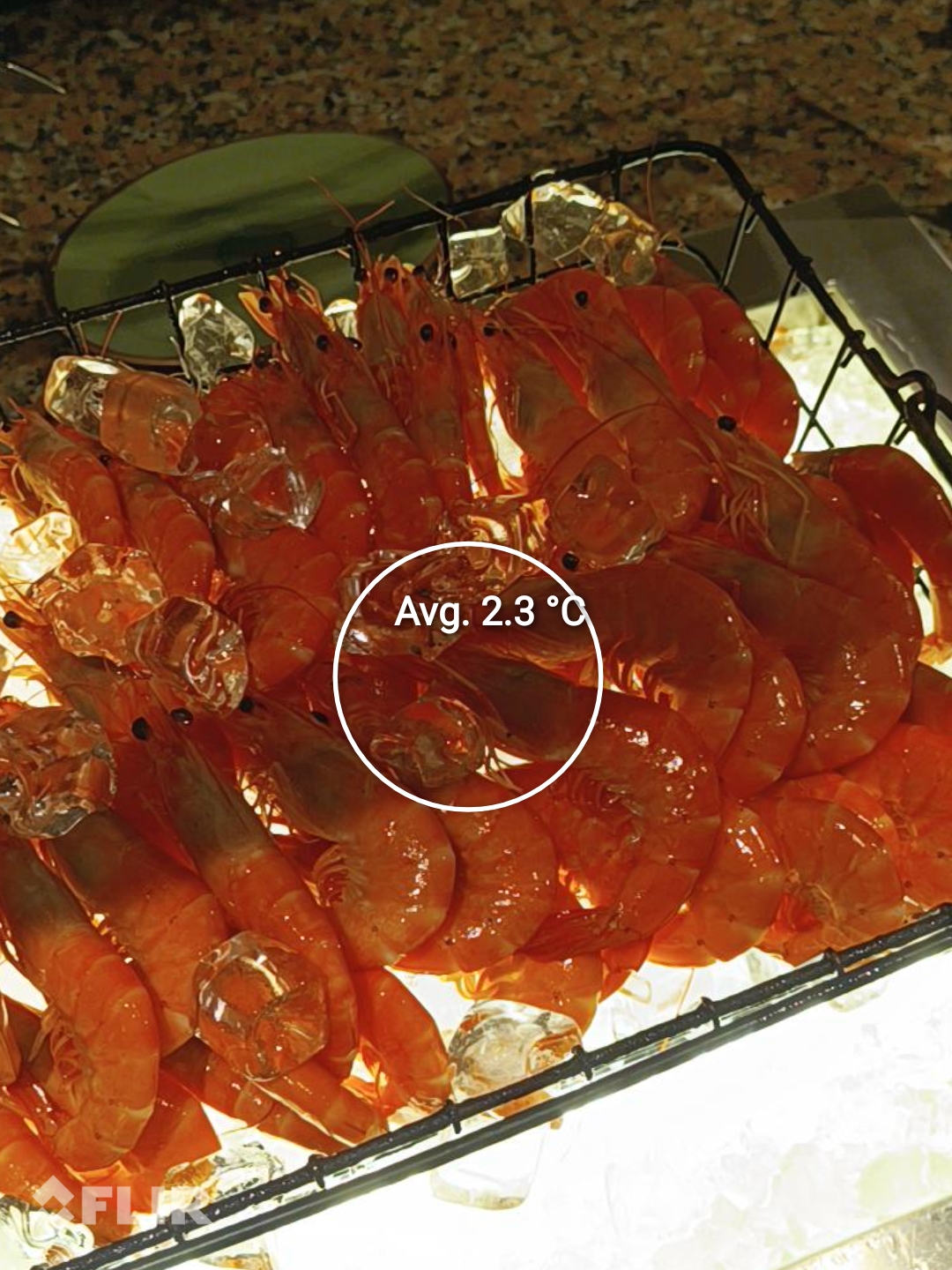
  * A circular “Region of Interest” (ROI) with an average temperature reading, or
  * A pinpoint marker showing a specific temperature.
* Ensure the food surface is the focus of this region for accurate readings.

#### 3. Capturing the Image

* Position the camera approximately 30 to 40 cm from the food item.
* Allow the camera to stabilize for a few seconds.
* Press the capture button to take the image.

  Each image will automatically generate a submission record.

***

<figure><img src="https://2326390636-files.gitbook.io/~/files/v0/b/gitbook-x-prod.appspot.com/o/spaces%2FhlcpP8RGwSYvfz0P333y%2Fuploads%2FK6cnqmvYO7NCXXzzszOE%2FMay%207%2C%202025%20at%201209PM.jpg?alt=media&amp;token=dc4bef17-14e4-4307-8e3b-296d9343029e" alt="" width="563"><figcaption></figcaption></figure>

### Temperature Guidelines

| Food Type          | Target Temperature Range |
| ------------------ | ------------------------ |
| Hot food (general) | Above 60°C               |
| Cooked wet dishes  | Above 75°C               |
| Chilled foods      | Below 5°C                |

* Always point the camera at the actual surface of the food.
* Avoid capturing surrounding surfaces that could produce inaccurate temperature data.

<table data-view="cards"><thead><tr><th></th><th data-hidden data-card-cover data-type="files"></th></tr></thead><tbody><tr><td>The ai extracts that the food is an apple and at 4.7ºC</td><td><a href="https://2326390636-files.gitbook.io/~/files/v0/b/gitbook-x-prod.appspot.com/o/spaces%2FhlcpP8RGwSYvfz0P333y%2Fuploads%2FiOAC14UPwRN8RnbUNorz%2Fflir_20250421T155009.jpg?alt=media&amp;token=17712b5c-aea2-4b46-a235-ba41d65ce022">flir_20250421T155009.jpg</a></td></tr><tr><td>The ai extracts the food is vegetable juice at 3.7ºC</td><td><a href="https://2326390636-files.gitbook.io/~/files/v0/b/gitbook-x-prod.appspot.com/o/spaces%2FhlcpP8RGwSYvfz0P333y%2Fuploads%2FUZzmc9b0bAW3CwVZ6Z0v%2Fflir_20250421T154933.jpg?alt=media&amp;token=b6f5d0ba-e47b-4d80-94c6-75c9495c224b">flir_20250421T154933.jpg</a></td></tr><tr><td>the ai extracts the food is kalamata olives at 4.4ºC</td><td><a href="https://2326390636-files.gitbook.io/~/files/v0/b/gitbook-x-prod.appspot.com/o/spaces%2FhlcpP8RGwSYvfz0P333y%2Fuploads%2Fqxd64yu49Oxu87lsGybq%2Fflir_20250421T155020.jpg?alt=media&amp;token=e5bc4a43-d39f-4b6f-9713-796d467f8596">flir_20250421T155020.jpg</a></td></tr><tr><td>The ai extracts that the food is wagyu tenderloin at 4.2ºC</td><td><a href="https://2326390636-files.gitbook.io/~/files/v0/b/gitbook-x-prod.appspot.com/o/spaces%2FhlcpP8RGwSYvfz0P333y%2Fuploads%2FSuKnP5f2MSel9oDS3TYv%2FApril%2016%2C%202025%20at%201119AM.jpeg?alt=media&amp;token=dbceb2cb-8e44-419e-b3ec-fc5b42cc9ac8">April 16, 2025 at 1119AM.jpeg</a></td></tr><tr><td>the ai extracts the food is chicken at 2.5ºC</td><td><a href="https://2326390636-files.gitbook.io/~/files/v0/b/gitbook-x-prod.appspot.com/o/spaces%2FhlcpP8RGwSYvfz0P333y%2Fuploads%2FsN8LhKMfS2RvhJ87Ap3H%2FApril%2016%2C%202025%20at%201208PM.jpeg?alt=media&amp;token=d646dbeb-d65d-4d8a-9c83-c9bfbcaa639d">April 16, 2025 at 1208PM.jpeg</a></td></tr><tr><td>The ai cannot extract this food item, and is at 2.4ºC</td><td><a href="https://2326390636-files.gitbook.io/~/files/v0/b/gitbook-x-prod.appspot.com/o/spaces%2FhlcpP8RGwSYvfz0P333y%2Fuploads%2FOKc0KbWT5f5TC8ZmQ3Bb%2FApril%2017%2C%202025%20at%201119AM.jpeg?alt=media&amp;token=4574704a-dddc-486d-a73a-5e8fa2f82a19">April 17, 2025 at 1119AM.jpeg</a></td></tr></tbody></table>

***

### Image Settings

* In the FLIR app, disable any thermal overlays or color filter modes.
* Only natural, visible-light images should be used.
  * This ensures the AI system can recognize food types, read text, and interpret labels.
  * Natural images lead to more reliable and accurate AI extractions.

***

### AI Automation&#x20;

After capturing an image:

1. It is uploaded automatically.
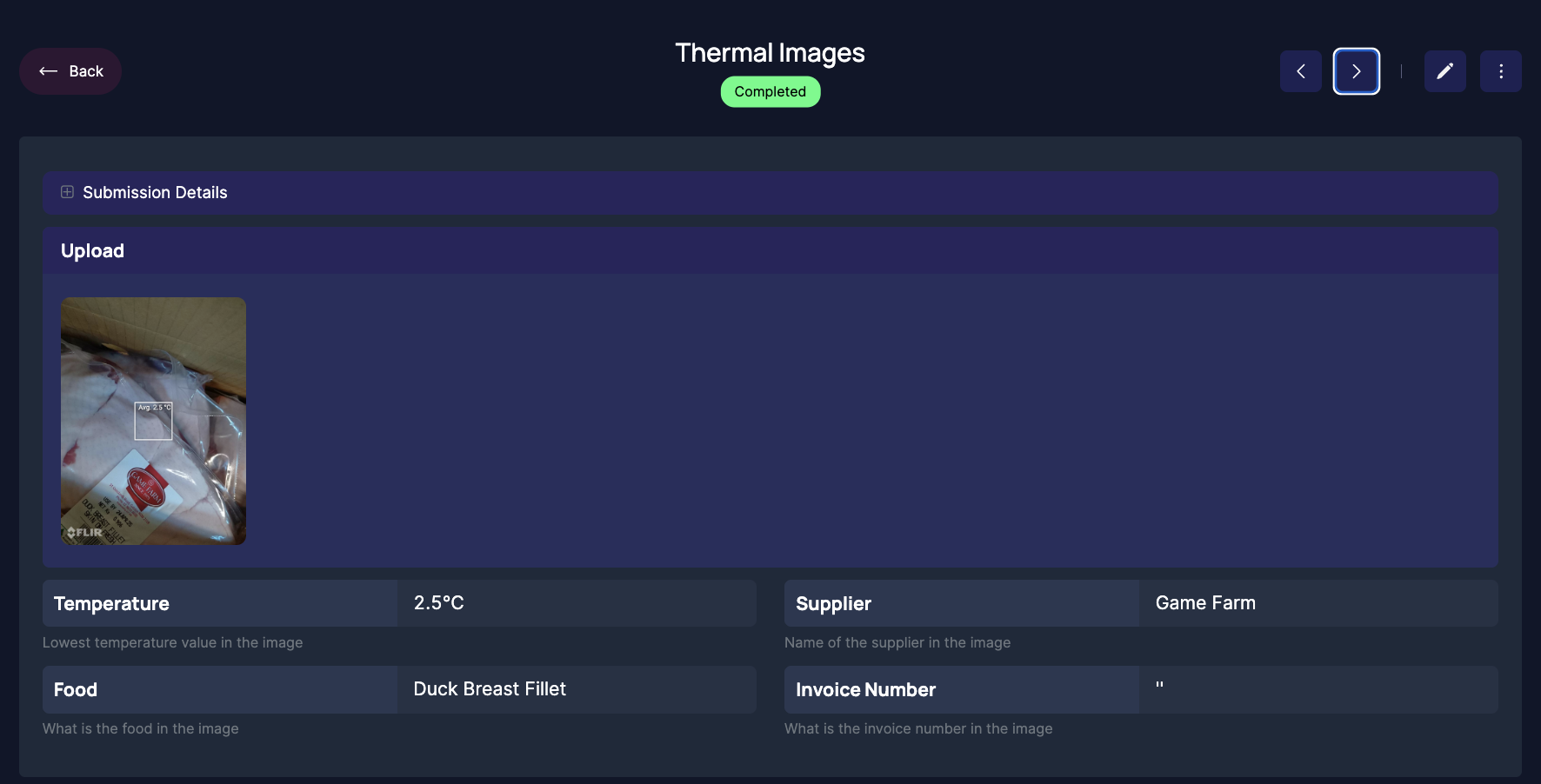
2. ChatGPT-4 processes the image to extract:
   * Food name and category
   * Surface temperature
   * Labels (e.g. supplier, expiry dates, invoice number)
3. A complete digital record is created automatically:
   * Includes original image, structured data, and temperature log.
   * Assigned to the correct area/device ID (e.g. Kitchen, Floor 3).

***

### Submissions and Reporting

* Each image equals one record.
* No manual login is required.
* Submissions are saved and structured with:
  * Natural image
  * Extracted data
  * Web report (viewable online)
  * Downloadable formats (PDF or Excel)
* View summaries and analytics via the reporting dashboard.

<figure><img src="https://2326390636-files.gitbook.io/~/files/v0/b/gitbook-x-prod.appspot.com/o/spaces%2FhlcpP8RGwSYvfz0P333y%2Fuploads%2Fb6m4tABTOxSlrTjFhLjw%2FScreenshot%202025-04-21%20at%203.35.30%E2%80%AFpm.png?alt=media&amp;token=975f7546-147e-4a01-8351-392e340457b0" alt=""><figcaption></figcaption></figure>

<figure><img src="https://2326390636-files.gitbook.io/~/files/v0/b/gitbook-x-prod.appspot.com/o/spaces%2FhlcpP8RGwSYvfz0P333y%2Fuploads%2Fha5roZQrrrErwaorvPBm%2FScreenshot%202025-04-21%20at%205.27.09%E2%80%AFpm.png?alt=media&amp;token=888a2978-ed89-4560-97da-eec6226c763a" alt=""><figcaption></figcaption></figure>

<figure><img src="https://2326390636-files.gitbook.io/~/files/v0/b/gitbook-x-prod.appspot.com/o/spaces%2FhlcpP8RGwSYvfz0P333y%2Fuploads%2Fgg8Dw1T46nHf5Do4IVRl%2FScreenshot%202025-04-21%20at%203.36.56%E2%80%AFpm.png?alt=media&amp;token=0bf21e26-0be7-40cf-b8be-6b9db37bc181" alt=""><figcaption><p>Incoming Goods - Record of delivery using thermal image + ai</p></figcaption></figure>

<figure><img src="https://2326390636-files.gitbook.io/~/files/v0/b/gitbook-x-prod.appspot.com/o/spaces%2FhlcpP8RGwSYvfz0P333y%2Fuploads%2FeudtzPjJAHBiB6RByRrH%2FScreenshot%202025-05-12%20at%2010.33.39%E2%80%AFpm.png?alt=media&amp;token=89dbb8ae-d1ae-45cc-93c1-8b4764ddf6e5" alt=""><figcaption><p>Reheating record using thermal image + ai</p></figcaption></figure>

***

### Use Cases

Buffet Monitoring

* For surface temperature tracking during production or service.

Food on display

* Cold food on display
* Hot food on display

Incoming Goods

* Capture images of incoming food and associated packaging or labels.
* AI can extract supplier, product, expiry date, and other compliance fields.

***

### Tips for Best Results

* Ensure the camera lens is clean.
* Maintain a consistent distance of 30–40 cm from the food.
* Hold the camera steady and give it time to stabilize before capturing.
* Make sure the correct item is centered in the Region of Interest.

<figure><img src="https://2326390636-files.gitbook.io/~/files/v0/b/gitbook-x-prod.appspot.com/o/spaces%2FhlcpP8RGwSYvfz0P333y%2Fuploads%2F4e7eS8qtAzZnYAYKDzO0%2FScreenshot%202025-04-21%20at%205.27.23%E2%80%AFpm.png?alt=media&amp;token=f83a2766-d2bf-4d87-9604-96af4ca92a4b" alt="" width="224"><figcaption></figcaption></figure>

<figure><img src="https://2326390636-files.gitbook.io/~/files/v0/b/gitbook-x-prod.appspot.com/o/spaces%2FhlcpP8RGwSYvfz0P333y%2Fuploads%2FWutkK6H0T5z2zxkEIbbB%2FScreenshot%202025-04-21%20at%205.28.16%E2%80%AFpm.png?alt=media&amp;token=cb9f671e-5b48-4e01-b5a7-70f642a50050" alt=""><figcaption><p>pdf export</p></figcaption></figure>

<figure><img src="https://2326390636-files.gitbook.io/~/files/v0/b/gitbook-x-prod.appspot.com/o/spaces%2FhlcpP8RGwSYvfz0P333y%2Fuploads%2FXhiecJvQRXVyu6IhSIe0%2FScreenshot%202025-04-21%20at%205.29.27%E2%80%AFpm.png?alt=media&amp;token=5f335919-f904-4326-b737-d7edfcae8170" alt="" width="563"><figcaption><p>Excel export</p></figcaption></figure>

***

<table data-view="cards"><thead><tr><th></th><th data-hidden data-card-cover data-type="files"></th></tr></thead><tbody><tr><td></td><td><a href="https://2326390636-files.gitbook.io/~/files/v0/b/gitbook-x-prod.appspot.com/o/spaces%2FhlcpP8RGwSYvfz0P333y%2Fuploads%2FmGivKKMLhZN9N3YyhruP%2FMay%205%2C%202025%20at%200634AM.jpg?alt=media&amp;token=c051476a-4e0b-4e5b-a6bf-da030cc5334a">May 5, 2025 at 0634AM.jpg</a></td></tr><tr><td></td><td><a href="https://2326390636-files.gitbook.io/~/files/v0/b/gitbook-x-prod.appspot.com/o/spaces%2FhlcpP8RGwSYvfz0P333y%2Fuploads%2F9or2C1pPpjln6xJCuOwk%2FMay%2010%2C%202025%20at%200555PM.jpg?alt=media&amp;token=c9f4b488-6202-4d9c-b04f-5e7cd36d0044">May 10, 2025 at 0555PM.jpg</a></td></tr><tr><td></td><td><a href="https://2326390636-files.gitbook.io/~/files/v0/b/gitbook-x-prod.appspot.com/o/spaces%2FhlcpP8RGwSYvfz0P333y%2Fuploads%2F3Zz9sqOst9q8R1SOvlgk%2FMay%2011%2C%202025%20at%200527PM.jpg?alt=media&amp;token=b7345f8f-96b8-4908-9a75-5ffe1c2b0010">May 11, 2025 at 0527PM.jpg</a></td></tr><tr><td></td><td><a href="https://2326390636-files.gitbook.io/~/files/v0/b/gitbook-x-prod.appspot.com/o/spaces%2FhlcpP8RGwSYvfz0P333y%2Fuploads%2FFIHGOLSaMWRmszXZspqm%2FMay%2011%2C%202025%20at%200542PM.jpg?alt=media&amp;token=ca5bae55-c0b6-4334-ae24-2cb6849a6635">May 11, 2025 at 0542PM.jpg</a></td></tr><tr><td></td><td><a href="https://2326390636-files.gitbook.io/~/files/v0/b/gitbook-x-prod.appspot.com/o/spaces%2FhlcpP8RGwSYvfz0P333y%2Fuploads%2FKy5VmTWmk5Pjuu7B9hDO%2FMay%2012%2C%202025%20at%201127AM.jpg?alt=media&amp;token=dc88356b-21e6-4177-8c8e-52a31319c49f">May 12, 2025 at 1127AM.jpg</a></td></tr><tr><td></td><td><a href="https://2326390636-files.gitbook.io/~/files/v0/b/gitbook-x-prod.appspot.com/o/spaces%2FhlcpP8RGwSYvfz0P333y%2Fuploads%2FKOA6fFGCt8zc8CbJVNrq%2FMay%2012%2C%202025%20at%200541PM%20(2).jpg?alt=media&amp;token=b7c971d5-2ea6-405f-8004-0f890c52c732">May 12, 2025 at 0541PM (2).jpg</a></td></tr><tr><td></td><td><a href="https://2326390636-files.gitbook.io/~/files/v0/b/gitbook-x-prod.appspot.com/o/spaces%2FhlcpP8RGwSYvfz0P333y%2Fuploads%2FFo9qnx1ChUMqTq3Icp1R%2FMay%2012%2C%202025%20at%200541PM%20(1).jpg?alt=media&amp;token=10007416-9366-4abc-8614-e98aa06475bc">May 12, 2025 at 0541PM (1).jpg</a></td></tr><tr><td></td><td><a href="https://2326390636-files.gitbook.io/~/files/v0/b/gitbook-x-prod.appspot.com/o/spaces%2FhlcpP8RGwSYvfz0P333y%2Fuploads%2FuNDsldv05lbHj29Fahxu%2FMay%2011%2C%202025%20at%201112AM.jpg?alt=media&amp;token=0438bb8b-c546-48eb-9636-691f6f537cd2">May 11, 2025 at 1112AM.jpg</a></td></tr><tr><td></td><td><a href="https://2326390636-files.gitbook.io/~/files/v0/b/gitbook-x-prod.appspot.com/o/spaces%2FhlcpP8RGwSYvfz0P333y%2Fuploads%2Fklyngsloe6h6tx13cto6%2FMay%2012%2C%202025%20at%200541PM.jpg?alt=media&amp;token=82554be6-7f0b-40b6-ad3f-9a6919400d64">May 12, 2025 at 0541PM.jpg</a></td></tr></tbody></table>


---

# Agent Instructions
This documentation is published with GitBook. GitBook is the documentation platform designed so that both humans and AI agents can read, navigate, and reason over technical content effectively. Learn more at gitbook.com.

## Querying This Documentation
If you need additional information that is not directly available in this page, you can query the documentation by asking a question.

Perform an HTTP GET request on the following URL with the `ask` and `goal` query parameters:

```
GET https://docs.didge.io/home/thermal-imagery-ai/end-user/core-functions/thermal-image-+-ai-+-didge.md?ask=<question>&goal=<user_goal>
```

`ask` is the immediate question: it should be specific, self-contained, and written in natural language.
`goal` is what the user is ultimately trying to achieve, the reason they need the answer. Sharing it helps GitBook give you a better, more relevant answer. A goal is most helpful when it describes the outcome the user wants rather than restating the question. For example, with `ask=how do I create an API token`, a goal like `automate deployments from our CI pipeline` lets GitBook tailor the answer to that use case.

The response will contain a direct answer to the question and relevant excerpts and sources from the documentation.

Use this mechanism when the answer is not explicitly present in the current page, you need clarification or additional context, or you want to retrieve related documentation sections.